This guide helps troubleshoot common errors encountered when using Pack-Time Label Generation (PTLG) to pack orders.
Note: PTLG is only available if it enabled for a reservation. For more information, see Packing Orders Using Pack-Time Label Generation (PTLG).
| Error Message |
How to troubleshoot |
|
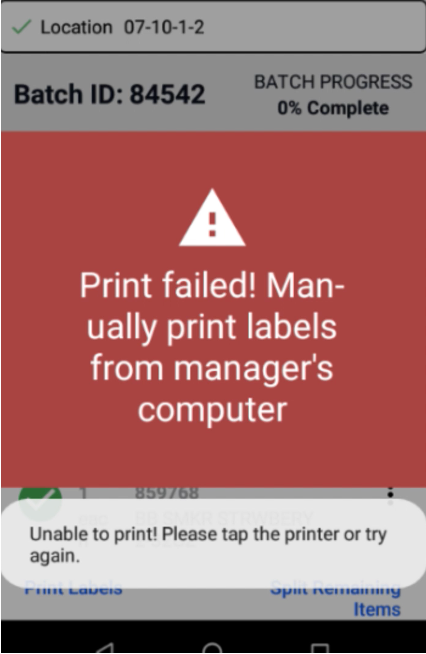
"Print failed! Manually print labels . . . . "
|
This error occurs when scanning the box barcode to print a shipping label. Here's how to troubleshoot:
-
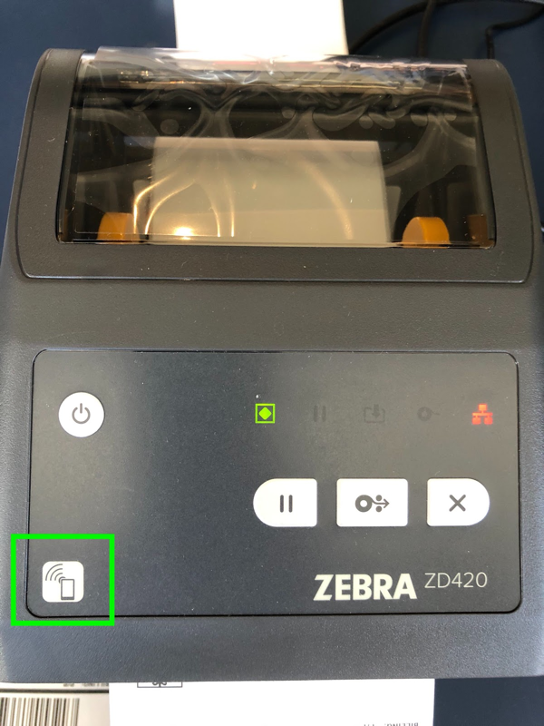
Confirm Mobile Device Connection: Ensure your Flexe mobile device is connected to the Zebra printer via Bluetooth. Note: Tap the mobile device on the printer's wireless button to establish a connection.
-
Verify Printer Power: Make sure the printer is connected to a power supply and switched on.
-
Check Printer Status: Ensure the printer is not in an error state (e.g. paper jam, out of labels). Consult the printer's user manual for troubleshooting specific error messages.
-
Restart Devices: Try restarting both the mobile device and the printer. This can often resolve temporary communication issues.
-
Contact Support: If the issue persists, contact Flexe Support at support@flexe.com for further assistance.
|
Comments
0 comments
Please sign in to leave a comment.